I have been spending more time testing brownfield imports into VCF 9.1 and wanted to understand what SDDC Manager actually checks before it accepts an existing environment. The UI gives a useful result, but it does not show the full validation path.
Most of the rules live in the Operations Manager assessment scripts on the SDDC Manager appliance. I went through the files shipped with the VCF 9.1 build in my lab and mapped the checks below. There are quite a lot of them!
This is a description of the validator in the build I tested, not a replacement for the Broadcom support matrix. Patch releases can change the rules. Some checks only run when the matching component is present; others depend on a feature variable or on whether the workflow is an IMPORT, CONVERT or SYNC.
My Lab Environment
I checked this on 16 July 2026 using build 9.1.0.0400-25570101 in my lab.
I counted 96 entries in the rule files.
For a normal initial workload-domain there’s 85 of those checks that are run.
There are 9 that are specifically about the convergence of the management domain and a couple of others that seem to be unused.
Some of the rules then are broken down and may not be run depending on if NSX is already in the environment, the storage types used, if NSX edges are to be imported, differing product versions, etc.
Where the validation scripts live
The main rule source of truth is found in:
/opt/vmware/vcf/operationsmanager/scripts/assessment/guardrails/operations/import/import.json
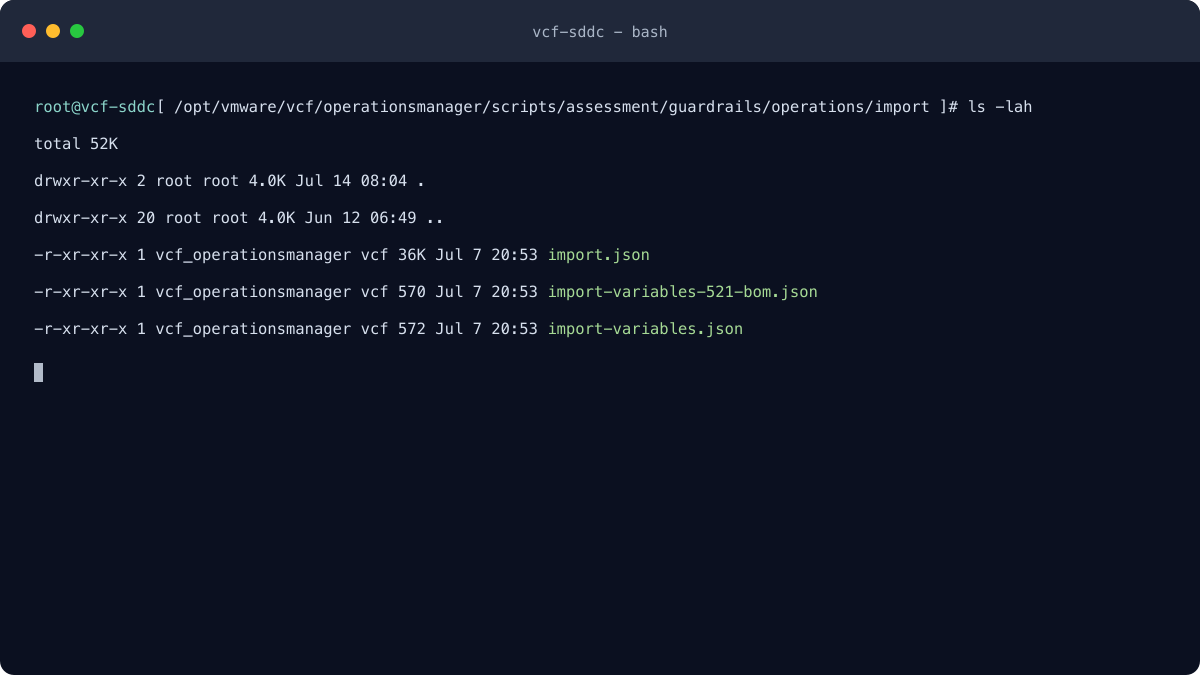
import.json also inherits common target states for adding and removing hosts, vCenter upgrade checks, ESX upgrade checks and NSX import checks. The individual files are under:
/opt/vmware/vcf/operationsmanager/scripts/assessment/guardrails/common/
The appliance also retains the Python version of the script at:
/opt/vmware/vcf/domainmanager/scripts/vcf-import-tool/vcf_brownfield.py
That Python file is not the source of the current 96-rule set.
In the build I inspected, feature.vcf.vgl-43431.port.brownfield.scripts=true selects the internal Java import path. The Python tool remains as a fallback.
The complete validation list
I have kept the exact validator IDs below because they are useful when matching a UI result, CSV report or operationsmanager.log entry back to the rule that produced it.
SDDC Manager and import eligibility
The first group is the set of basic gatekeepers. It checks that the product combination makes sense, that SDDC Manager itself has usable DNS and time configuration, and that the target will still fit inside the VCF scale limits.
- VCF product compatibility – bion-compatibility-validator (critical). This is the big compatibility check. It takes the discovered ESXi, vCenter and NSX versions as a combined product set and compares them with the VCF compatibility data.
- vCenter and shared NSX compatibility – nsx-vc-compatibility-validator (critical, conditional). When the import will share an existing NSX instance, checks that the vCenter and NSX versions are compatible with one another.
- SDDC Manager hostname – sddc-manager-hostname-validator (critical, convert only). Checks that the SDDC Manager appliance hostname is a fully qualified domain name.
- SDDC Manager DNS configuration – sddc-manager-dns-validator (critical). Checks that SDDC Manager has a DNS server configured.
- SDDC Manager NTP configuration – sddc-manager-ntp-validator (critical). Checks that SDDC Manager has an NTP server configured.
- At least one conforming cluster – conforming-cluster-present-check (critical on convert; informational on most imports). A management-domain CONVERT needs at least one cluster with more than one host. On the other import paths, any discovered cluster, including a one-host cluster, produces an informational success. If discovery finds no cluster at all, the check fails unless feature.vcf.vgl-43302.domain.without.cluster allows a domain without one.
- Primary-cluster capacity for NSX – nsx-deployment-cluster-size-validator (warning, conditional). When the import requests a new three-node NSX deployment, checks that the vCenter primary cluster contains at least three ESXi hosts for those NSX Manager VMs.
- NSX Manager host scale – nsx-manager-scale-validator (warning, feature-gated). When the NSX form factor is known and is not xlarge, warns if the resulting NSX Manager would manage more than 2,500 hosts. An unknown form factor does not fail this check; a failure inside the evaluator itself is critical.
- VCF scale limits – vcf-scale-limits-validator (critical, non-sync). Initial import adds the discovered hosts to the existing SDDC Manager inventory and compares the result with the default 20,000-managed-host ceiling. It also fails if 40 workload domains already exist. CONVERT separately caps the hosts discovered under the management vCenter at 2,500.
- NSX deployment image availability – nsx-deployment-image-validator (critical, conditional). When VCF will deploy NSX, checks that a compatible NSX version can be selected and that its install image is available through LCM/depot content.
- vCenter VM network attachment – vc-vm-attached-to-dvpg-validator (critical). Checks that the vCenter Server VM is connected to a distributed port group associated with management or VM-management traffic, not an unrelated traffic type.
- VCP version combination – vcp-cluster-version-validator (critical, sync only, feature-gated). When network-configuration unification is enabled, checks that the vCenter, ESXi and NSX versions in a vSphere Configuration Profiles-enabled cluster are a supported combination.
- vCenter root credential – vc-root-password-validator (critical, conditional). When SSH is enabled, attempts to connect to vCenter with the supplied root password.
- vCenter and SDDC Manager time difference – vc-time-diff-with-sddc-validator (critical). Requires their clocks to be within 45 seconds.
- vCenter IP address family – vc-ip-address-family-validator (critical with IPv6 warning cases, dual-stack feature). The blocking IPv4 path checks that DNS returns an IPv4 address, that an active VCSA interface has IPv4 configured, and that the DNS and interface addresses match. With a dual-stack SDDC Manager, missing or mismatched vCenter IPv6 information is reported as a warning. With an IPv4-only SDDC Manager, any vCenter IPv6 DNS or interface configuration is critical.
vCenter configuration
The vCenter section is much larger than I expected. It covers the obvious things such as version, DNS and NTP, but also appliance update state, latency, ELM, aliases, storage associations and evidence that another SDDC Manager may already own it.
- vCenter licence for the NSX deployment path – vc-license-support-for-convert (critical, conditional). When deployNSX is true and vCenter is newer than 9.0.0.0, checks that the vCenter licence supports the operation. Despite the validator name, this is not restricted to CONVERT.
- vCenter SSH enabled – vc-ssh-login-enabled (critical). Requires SSH login to be enabled on the vCenter appliance.
- No existing SDDC Manager extension – non-sddc-manager-extension (warning, non-sync). This one is worth paying attention to. An existing extension can mean another SDDC Manager owns the vCenter, but it can also be debris from an earlier failed import.
- Not a classic VxRail-managed vCenter – non-vxrail (critical). Requires the discovered VxRail Manager address to be absent.
- VxRail Next handling – vc-min-version-with-vxrail-next (critical, feature-gated). Rejects a VxRail Next association unless the feature and the required vCenter floor allow that path. The default VxRail Next vCenter floor in this build is 9.2.0.0.
- Existing NSX for legacy conversion – vcenter-8.x-convert-nsxt-present (critical, convert only). Under the 5.2.1-BOM conversion branch, a pre-9.0 vCenter must already have an NSX Manager association.
- vCenter floor when conversion deploys NSX – vcenter-8.x-convert-nsxt-deploy (critical, convert only). If conversion will deploy NSX, requires vCenter 9.1 or later.
- No conflicting NSX association – vcenter-no-nsxt (critical, conditional). On a branch where VCF will deploy NSX, or where the supplied vCenter is declared not connected to NSX, requires no NSX address to have been discovered.
- NSX topology for older vCenter – vcenter-version-nsxt-cluster-size (critical, conditional). For a pre-9.0 vCenter receiving a dedicated NSX deployment, requires the three-node NSX cluster shape.
- vCenter appliance update state – vcenter-appliance-update-status (critical). Checks that the VCSA update status is valid before ownership is transferred.
- vCenter connection latency – vcenter-connection-latency (warning). Warns when measured latency is over 110 ms or when latency could not be obtained, which is represented by -1.
- Cross-vCenter vSAN datastore source – vsan-xvc-datastore-source (critical, feature-gated). When the broader brownfield storage feature is off, rejects a vCenter that is the source of a cross-vCenter vSAN datastore.
- Cross-vCenter vSAN datastore warning – vsan-xvc-datastore-source-warning (warning, feature-gated). Runs the same test as a warning when the storage feature is enabled.
- Mounted vVol datastore – vvol-datastore-mounted (critical, feature-gated). Rejects import or conversion when the vVol-block feature is enabled and a vVol datastore is mounted.
- Minimum vCenter version – vcenter-min-version (critical). For initial import, requires at least 8.0.1.00000-21815093. The default conversion floor is 9.1.0.0; the alternate 5.2.1-BOM conversion floor is 8.0.3.
- CEIP discovery data – vcenter-ceip-data-missing (warning). Slightly surprisingly, missing vCenter CEIP state is called out as a warning.
- Enhanced Linked Mode – vcenter-elm-check (critical, non-sync). Requires the discovery to contain exactly one vCenter node rather than an ELM-linked group.
- External identity provider – vcenter-idp-check (warning, convert only). Warns when VMware SSO federation is configured as the identity provider during management-domain conversion.
- vCenter NTP reachability – vcenter-ntp-check (critical). Requires the NTP servers configured on vCenter to be reachable.
- vCenter DNS resolution – vcenter-dns-check (critical). Requires the vCenter FQDN to resolve forward and reverse.
- No vCenter FQDN aliases – vcenter-fqdn-aliases-check (critical). Rejects a vCenter with additional FQDN aliases.
Cluster, storage and vSphere networking
This is where most of the practical design constraints live. The storage rules are especially conditional: the answer changes depending on whether the newer brownfield storage feature is enabled, whether the cluster is stretched, and where the vCenter VM is running.
IP addressing and vSAN traffic
- ESXi IP address-family rules – esxi-ip-address-family-validator (critical, dual-stack feature). Management traffic may be IPv4-only or dual-stack; vMotion may be IPv4-only or IPv6-only; all hosts must use a consistent family for each traffic type.
- vSAN VMkernel traffic – vsan-cluster-esxi-vmk-traffic-type-validator (critical, vSAN only). Requires every ESXi host in a vSAN cluster to have a VMkernel adapter carrying vSAN traffic.
Stretched and advanced storage
- Stretched vSAN cluster support – cluster-stretch-configuration (critical, feature-gated). When brownfield storage support is off, rejects a stretched vSAN cluster.
- Stretched compute cluster support – compute-cluster-stretch-configuration (critical, feature-gated). When brownfield storage support is off, rejects a stretched compute cluster.
- Remote vSAN datastore support – vsan-remote-datastore (critical, feature-gated). When brownfield storage support is off, rejects a cluster using a remote vSAN datastore.
- vSAN Max support – vsan-max-cluster-configuration (critical, feature-gated). When brownfield storage support is off, rejects a vSAN Max cluster.
- Management stretched-vSAN size with the vCenter VM inside – mgmt-vsan-stretch-cluster-with-vc-vm-min-size (critical, convert only, storage feature on). Requires at least six hosts and at least three hosts in each fault domain.
- Management stretched-vSAN size with the vCenter VM outside – mgmt-vsan-stretch-cluster-without-vc-vm-min-size (critical, convert only, storage feature on). Requires at least four hosts with at least two per fault domain, or the supported two-host shape with one per fault domain.
- VI-domain stretched-vSAN size – vi-vsan-stretch-cluster-min-size (critical, import only, storage feature on). Requires at least four hosts with at least two per fault domain, or the supported two-host shape with one per fault domain.
- Management stretched-compute size with the vCenter VM inside – mgmt-compute-stretch-cluster-with-vc-vm-min-size (critical, convert only, storage feature on). Requires at least six hosts and at least three hosts per fault domain.
- Management stretched-compute size with the vCenter VM outside – mgmt-compute-stretch-cluster-without-vc-vm-min-size (critical, convert only, storage feature on). Requires at least two hosts and at least one host in each fault domain.
- VI-domain stretched-compute size – vi-compute-stretch-cluster-min-size (critical, import only, storage feature on). Requires at least two hosts and at least one host in each fault domain.
VCP, dvSwitch & lifecycle
- VCP cluster product floor – cluster-vcp-check (critical, feature-gated). For a VCP-enabled cluster on the older network-configuration branch, requires vCenter 8.0.3-24674346 or later and no ESXi host below 8.0.3.
- VCP cluster floor when deploying NSX – cluster-vcp-check-deploy-nsx (critical, conditional). With network unification enabled, a vCenter 9.x cluster must contain no host below 9.x; the vCenter 8.x branch requires the same 8.0.3 build floor and no host below 8.0.3.
- Management VMkernel on one DVS – cluster-dvs-management-vmk (critical, conditional). For the applicable NSX overlay path, requires every host’s management VMkernel adapter to be on the same distributed switch unless overlay-over-management is explicitly skipped.
- Management VMkernel DVS MTU – cluster-dvs-management-vmk-mtu-check (critical, conditional). Requires the DVS carrying the management VMkernel to have an MTU of at least 1700 when NSX Overlay over the management network will be used.
- Management VMkernel teaming policy – cluster-dvs-management-vmk-teaming-policy-check (critical, conditional). On the vCenter 9.0-to-9.1 branch, rejects Route based on physical NIC load on the management VMkernel distributed port group when NSX Overlay over the management network will be used.
- vSAN Max placement of vCenter – mgmt-vsan-max-cluster (warning, convert only, storage feature on). Warns when the management-domain vCenter VM is placed inside the vSAN Max cluster being converted.
- vLCM image-managed cluster – vlcm-image-based-cluster (critical, conditional). For vCenter 9.0 or later, requires the cluster to use a vLCM image rather than baselines.
- Existing vLCM state during NSX deployment – vlcm-cluster-compliance (warning, conditional). When VCF will deploy NSX, flags a cluster that is already vLCM image managed and tells the operator to check that the image is compliant before continuing.
- Existing VCP state during NSX deployment – vcp-cluster-compliance (warning, conditional). When VCF will deploy NSX, flags a cluster already managed by vSphere Configuration Profiles and tells the operator to check or remediate VCP compliance. The message notes that SDDC Manager can update the VCP configuration document if it is not remediated manually.
ESX host checks
The host checks are more straightforward. They are mostly looking for a host that SDDC Manager can identify by FQDN, trust by certificate, keep in time, place on the right VMkernel networks and eventually manage through lifecycle operations.
- VMkernel traffic layout – host-vmk-traffic-type-validator (critical). Requires both MANAGEMENT and VMOTION traffic, normally with each type assigned to only one VMkernel adapter. Each VMkernel’s port-group reference must resolve to a discovered distributed port group. Duplicate management traffic is tolerated only when the standard switch vSwitchBMC is present.
- Minimum ESXi version – host-min-version (critical). The initial import floor is 8.0.1-21813344. The default conversion floor for a host in the cluster containing the vCenter VM is 9.0.0.0; the alternate 5.2.1-BOM conversion floor is 8.0.1.
- ESXi certificate identity – host-base-certificate-cn-sans-valid (critical). Requires the host FQDN to match the certificate common name or one of its DNS SANs.
- ESXi hostname format – host-base-name-fqdn (critical). Requires each clustered host name to be an FQDN. No host is allowed to be joined by it’s IP address alone!
- ESXi NTP service – host-base-ntp-running (critical). Requires NTP to be running on each clustered host.
- No stateless clustered hosts – host-stateless-check (critical). Rejects PXE boot and an Auto Deploy image-cached state of stateless.
- Host connection state – host-connected (warning or critical). Requires the host to be connected. It is critical for sync and deploy-NSX paths and otherwise reported as a warning.
- No stateless standalone hosts – standalone-host-stateless-check (critical). Applies the stateless/PXE test to standalone hosts, excluding the product-owned VMware Mobility Platform model.
- Standalone-host FQDN – host-base-name-fqdn (critical). Applies the FQDN test to standalone hosts, again excluding the VMware Mobility Platform model.
Why upgrade and host-removal checks
These checks come into the brownfield side of things through the shared add-host, remove-host, vCenter-upgrade and ESX-upgrade target states. That is why a few of them look more like future lifecycle-readiness checks than simple import checks.
- vCenter High Availability disabled – vcenter-high-availability (critical). Requires vCenter HA not to be enabled.
- Distributed switch present – cluster-dvs-presence-validation (critical). Requires every non-empty cluster to have at least one attached distributed virtual switch.
- Physical NIC bandwidth – host-pnic-bandwidth (warning). Looks at hosts whose minimum pNIC speed is present, whose vendor is not exactly VMware, Inc. (indicating it handles vSAN Witness appliances), and whose speed is above 100 Mb/s. It warns when that minimum is below 10,000 Mb/s.
- Remove-host shared-state count – remove-host-shared (critical count expression). It seems to cover N-1 capability so hosts can be readied for NSX during import.
- VMs pinned to hosts – vms-not-pinned-to-host (warning). Warns when vCenter reports VM-to-host affinity faults that can prevent host evacuation or lifecycle operations.
- vCenter-upgrade shared-state count – vcenter-upgrade-shared (critical count expression). Requires the inherited vCenter-upgrade target state to resolve at least one applicable resource.
- vCenter VM location – vc-colocated-vm-validator (critical). Requires the vCenter VM to be managed by that vCenter itself or by the VCF management domain.
- Lookup Service running – vcenter-7-lookupsvc-state (critical). Requires the vCenter Lookup Service state to be STARTED.
- vpxd running – vcenter-7-vpxd-state (critical). Requires the vCenter Server service state to be STARTED.
- ESX-upgrade shared-state count – esx-upgrade-shared (critical count expression). Requires the inherited ESX-upgrade target state to resolve at least one applicable resource.
- ESXi upgrade-policy alignment – esxi-upgrade-policy-validator (warning for drift; critical on evaluation failure). Compares Quick Boot, offline-VM evacuation, DPM and HA handling, HCL validation, failure action, retry delay, retry count and pre-remediation power action with SDDC Manager defaults. Quick Patch is included in the comparison only when vCenter is at least 8.0.3.
-
Common primary datastore – primary-data-store-pre-import-validator (critical, with one warning branch). If existingDatastoreName is supplied, validation is restricted to that datastore. Before selecting it, the validator applies cluster-size gates: initial IMPORT needs at least three hosts for vSAN or two for external storage; a vLCM CONVERT uses the same three/two split; and a non-vLCM CONVERT needs four hosts when the vCenter VM is in the cluster, otherwise three. The stretched, compute-only and single-host feature branches can then provide their documented exceptions. A candidate datastore must be shared by every host and accessible read-write from every host.
- With expanded brownfield storage off, external storage is limited to NFS 3 or FC. NFS 4.1 produces a failed validation at warning severity rather than a critical result.
- With expanded storage on, VMFS, NFS, NFS 4.1 and vVol can be considered. That vVol eligibility is separate from rule 29: the vVol-block feature there can still stop the workflow.
- For vSAN, the declared Skyline results cover overall health and capacity, cluster encryption and KMS connectivity, physical-disk component health, and object health.
- The vSAN network set covers each host’s vSAN VMkernel, hosts disconnected from vCenter, host-connectivity faults, cluster partitions, unicast connectivity and MTU, plus vMotion unicast and MTU connectivity.
- The disk and HCL set covers heap, slab and operation health; HCL database currency; controller disk-group mode, ESXi certification, driver and firmware certification; and SCSI device certification except on the Nimbus vendor path.
- The remaining cluster checks cover advanced vSAN configuration being in sync and vSAN daemon liveness. ESA and compute-only clusters deliberately skip the checks that do not apply to their architecture.
-
DRS configuration – cluster-drs (critical). A one-host cluster passes; a multi-host cluster must have DRS enabled and set to Fully Automated.
- Cluster host count – host (critical count expression). Accepts three or more hosts, two or more when vSAN is not enabled, the supported two-host stretched-vSAN shape, zero where the inherited target state is not applicable, or one host when the dedicated single-host brownfield feature is enabled.
- Duplicate host-connected check – host-connected (disabled). A second inherited warning check exists but its filter is literally false, so it never runs. It’s the only disabled rule I could find. I[‘m guessing it was a weird edge case that’s no longer needed.
- VM affinity faults in the ESX-upgrade state – vms-not-pinned-to-host (warning). Repeats the pinned-VM/affinity-fault check in the inherited ESX-upgrade target state.
NSX checks
The NSX section only comes into play for the branch selected in the import wizard. Sharing an existing NSX, importing a dedicated one and asking VCF to deploy a new one do not run exactly the same set of checks.
- NSX Manager certificates – nsx-manager-certificate-validator (critical, non-sync, non-shared NSX). For the VIP and every Manager node, checks that the certificate signature algorithm is supported, the public-key algorithm is supported (RSA, ECDSA or EC by default), and the CN/SAN identity matches.
- NSX compute-manager registration – nsx-import-compute-manager-validator (critical, non-sync, connected-to-NSX path). When the vCenter is declared connected to NSX, requires it to be registered as an NSX compute manager and, unless NSX is being shared, rejects the multiple-NSX association condition.
- NSX Manager VM location – nsx-import-vms-location-validator (critical, non-sync, non-shared NSX). Requires every NSX Manager VM to be in the expected imported vCenter. On the management-domain path, placement means the primary cluster of the management vCenter, not merely somewhere in that inventory.
- NSX node credentials – import-nsx-nodes-password-validator (critical, non-sync, non-shared NSX). Tests root credentials through vSphere Guest Operations and audit credentials through an NSX version API call. If a credential type was not supplied, that particular test is skipped.
- NSX node type – nsx-node-type-validator (critical, non-sync, non-shared NSX). Requires each supplied appliance node to report the supported type NSX Manager.
- NSX virtual IP – nsx-vip-address (critical). Requires a real cluster VIP rather than a null value or 0.0.0.0.
- NSX Federation not present – nsx-is-federated (critical, feature-gated). When network unification is off, rejects a federated NSX instance.
- NSX Federation compatibility warning – nsx-is-federated-warning (warning, feature-gated). With network unification enabled, warns about federation on an NSX version below 9.0.1.
- Bare-metal Edge node – nsxt-is-bare-metal-edge-present (warning, conditional). When Edge clusters are being imported on the unified-networking branch, warns if a bare-metal Edge is present.
- Minimum NSX version – nsx-import-min-version (critical). The default initial minium version is 4.1.0.2.0; the default conversion floor is 9.0.0.0. The alternate 5.2.1-BOM conversion floor is 4.2.1.0.0.
- Minimum NSX version for Edge import – nsx-edge-import-min-version (critical, conditional). Requires NSX 9.0.0.0 or later when existing Edge clusters will be imported rather than a new NSX instance deployed.
- NSX Edge-cluster health – nsxt-is-edge-cluster-healthy (warning, conditional). When importing Edge clusters on NSX 9.0.0.0 or later, warns if an Edge cluster is not healthy.
- NSX Edge-node health – nsxt-is-edge-node-healthy (warning, conditional). In the same path and at the same 9.0.0.0 floor, warns if an individual Edge node is not healthy.
Distributed switch version
The final definition is simple, but it is an easy one to miss when checking an older environment by hand.
- Minimum DVS version – dvs-version-check (critical). For a distributed switch with connected hosts, requires DVS version 7.0.3 or later.
Checks that happen outside the 96-rule report
This is the part that is easy to miss. Passing the guardrail report does not mean the actual import has finished checking the environment.
The Java import path, and the Python fallback when selected, can still stop or roll back on these checks:
- validation of the import specification and credentials before discovery starts
- vCenter FQDN resolution, TCP and API reachability, authentication and certificate/thumbprint trust
- correct ownership and location of the vCenter VM and any NSX Manager VMs
- existence of a management domain for VI import, absence of one for first-domain conversion, a unique domain name, and confirmation that the vCenter is not already imported
- discovery of every cluster, host, DVS, port group, VMkernel network, datastore, vSAN disk, certificate and service credential needed to build the SDDC inventory payload
- network-pool consistency, including static addresses, subnet, mask, gateway, VLAN, MTU and merge conflicts
- creation and onboarding of ESXi service accounts; Lockdown Mode can block this after the assessment has passed
- a second inventory comparison immediately before import so hosts added to or removed from vCenter during the run are detected
- certificate and SSH known-host import, inventory and credential persistence, logical activation, and LCM/inventory cache refresh
- NSX input validation, FQDN/VIP resolution, credentials, node count, node health, certificates, and Edge password-reset or consent handling for the selected NSX branch
These are execution-time checks, so I have not counted them in the 96 rule entries.
Got a Green Tick! …but it doesn’t guarentee success!
A green result tells me that the checks which applied to my chosen import path passed at that moment. It does not tell me that the environment will stay unchanged until the import starts.
SDDC Manager still has to create ESXi service accounts, write the inventory and complete the selected NSX configuration. It also has to refresh LCM state and survive any interruption while doing that. The ESXi Lockdown Mode example is a good illustration: the assessment can be green and the later service-account step can still fail.
The version checks are minimums, not “latest patch” checks. Passing 8.0.1-21813344 for ESXi or 8.0.1.00000-21815093 for vCenter does not say the source environment is fully patched.
Broadcom KBs
Broadcom has published a few helpful examples that show these checks and the later execution gates in real failures:
- Import guardrails and ESXi upgrade-policy drift (KB 409568)
- Common-datastore validation and vSAN health (KB 423358)
- A stale SDDC Manager extension on vCenter (KB 404182)
- vCenter SSH reachability during import validation (KB 419927)
- ESXi Lockdown Mode blocking service-account creation after validation (KB 430056)
That was a marathon…
The validator is doing much more than checking a username and password. It is checking whether vCenter, the ESX hosts, storage, networking and NSX look like something SDDC Manager can take ownership of and manage.
A green result is a strong pre-flight check for the exact VCF build being used, but it is not a promise that every later import task will succeed. I’ve done a convergence and found other oddities that caused for failed imports to occur but they usually get picked up on subsequent patch releases. For me, the useful part of reading the scripts was seeing exactly what SDDC Manager had already tested, and what I still needed to check separately.