This is the third post in my MS-A2 VCF Lab series, and it’s where things start to get interesting.
In VMware Cloud Foundation when a host is decommissioned you are meant to remove all partitions and reinstall the operating system cleanly. This can be a little painful for customers with hundreds or thousands of hosts!
In my small lab setup I really couldn’t face the prospect of managing at least 22 kickstart files (11 hosts x 2 major ESXi/ESX versions) so I looked into how to dynamically provision the kickstart file on demand based on the MAC of the MS-A2 host.
My aim was to have:
1. PXE boot working from the network
2. A clean iPXE menu to select different versions of ESX depending on what type of testing I am doing
Network Setup
The foundation of this build is the Build VLAN. I’ve configured it as the native VLAN on the switch port where the hosts live. This ensures any host dropped into that VLAN will grab an address and attempt PXE boot with minimal fuss. Of course in production you would make safeguards so there wouldn’t be accidental reimaging of hosts!
On the MS-A2 MiniPC (my lab ESXi hosts), PXE works when you tell the BIOS to boot from the first Intel X710 NIC. Without that, the firmware won’t hand over to iPXE properly.
My Unifi Enterprise Fortress Gateway (EFG) provides DHCP for most of my VLANs. I’ve set DHCP options to hand out:
• Network Boot = PXE boot server IP (Synology in my case)
• Boot filename = ipxe.efi
PXE Boot Environment
The PXE environment lives on my Synology NAS:
• TFTP server enabled
• ipxe.efi placed in the TFTP root
• An autoexec.ipxe script that is chained after ipxe.efi starts; it launches the boot menu and wires in the Kickstart generator
There is also a need for a webserver to host the installation binaries. I used the Synology’s native webserver capability to host the ESX installation files.
When an MS-A2 host powers on, it DHCPs, pulls down ipxe.efi, then chains to autoexec.ipxe and loads my custom boot menu. From there, I can select which ESXi version to deploy (8.0.3, 9.0.0.0, 9.0.0.100, 9.0.1.0, etc.), or just let the default boot after a timeout.
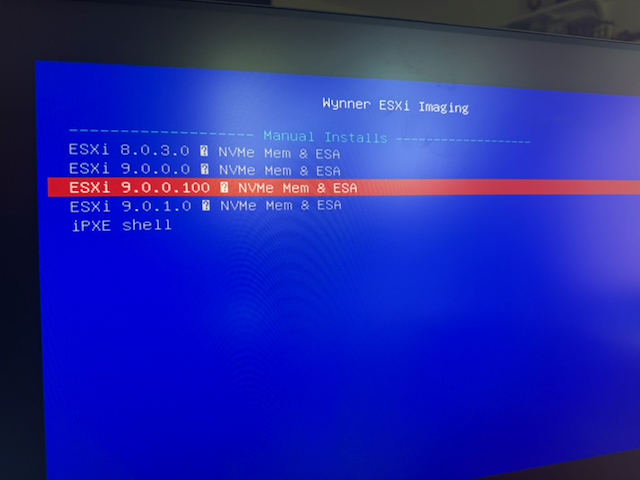
Dynamic Kickstart Files
Static kickstart files are fine if you only have one or two hosts, but I wanted reproducible installs with per-host customization.
Here’s how I solved it:
• Each PXE menu entry includes a kickstart URL pointing at my Synology webserver
• The URL calls a PHP script (gen.php) and passes the host’s MAC address and ESXi version as variables
• gen.php looks up the MAC in a CSV (hosts.csv) where I store hostname, IP, gateway, disk layout, NVMe model, etc
• Based on that, it generates a host-specific Kickstart file tailored to that host
This allows me to keep host-specific data in one simple CSV while generating full automation on the fly.
Install Flow
1. PXE Boot – The host pulls ipxe.efi from TFTP and chains to autoexec.ipxe
2. Menu Selection – iPXE menu prompts which ESXi/ESX version to install
3. Kickstart URL – The chosen entry calls gen.php with the MAC address
4. Dynamic Kickstart – PHP builds the correct configuration for hostname, IP, VLAN, NTP, SSH keys, disk layout, and (if present) NVMe tiering. Inspiration for the content of the kickstart goes to William Lam.
5. Install + Reboot – The ESXi installer runs, reboots twice, and the host comes up fully functional with the right settings applied
At the end of this process, I have a cleanly imaged ESXi host that’s ready to be commissioned by VCF’s SDDC manager.
Example: Host Data in CSV
The hosts.csv file is where the magic happens. It maps MAC addresses to hostnames, IPs, VLANs, versions, and disks. For example:mac,hn,ip,mask,gw,vlan,nic,ver,firstdisk,nvmetier
38:05:25:30:72:01,esx01.wynner.ie,192.168.10.6,255.255.255.0,192.168.10.1,10,vmnic1,9.0.0.100,"Lexar SSD NM620 512GB","Samsung SSD 990 PRO 2TB"
When ESX01 boots, the MAC lookup in hosts.csv provides its full build profile.
Why This Saves Me Time!
With this setup:
- I can reimage any ESXi host in the lab with one reboot
- It ensures consistency across builds (no missed steps, no typos)
- Adding a new host is as simple as dropping its MAC into the CSV
- The system scales to multiple ESXi versions side-by-side, great for testing VCF 5.x/9.x architectures
Files and Code
The supporting iPXE and kickstart framework is now published in my public GitHub scripts repo. Treat it as a starting framework rather than a complete ESXi media mirror: you still need to supply your own licensed ESXi installation media, update the hard-coded PXE server address, replace lab DNS/NTP/SSH key/root password values, and validate the disk wipe commands for your own hardware.
The generated kickstart can erase VMFS datastores visible to the installer, so review the clearpart and install settings before booting real hosts.
Main repo folder: https://github.com/wynner/scripts/tree/main/pxe-deployment
Direct files: autoexec.ipxe, gen.php, and hosts.csv.
For the iPXE handoff details, the iPXE project has good notes on chainloading and scripting.